What Your Shopify Subscription Portal Is Probably Missing
- Updated: July 22, 2026
Table of Contents
A self-service portal can resolve up to 70% of subscription support tickets before a single email hits your inbox. That’s the gap between a subscriber who quietly skips a delivery and one who gives up and cancels because they couldn’t find a way to change it themselves.
Most Shopify stores selling subscriptions don’t lose customers because of price or product. They lose them because managing a subscription feels harder than it should. A Shopify subscription customer portal is supposed to fix exactly that, but only if it’s built with the right features and set up correctly from day one.
Below, you’ll find the exact features to include, the setup steps that actually matter, and the mistakes that quietly push subscribers toward canceling instead of staying.
What Is a Shopify Subscription Customer Portal?
Your Shopify customer account page shows order history. That’s it. A subscriber logging in there can see what they bought last month, but they can’t pause next month’s shipment or swap a product without emailing you first.
A subscription customer portal is a separate, dedicated space built specifically for managing an active subscription. It sits apart from the generic Shopify account page, usually accessed through a direct link in your emails or a button on your storefront.
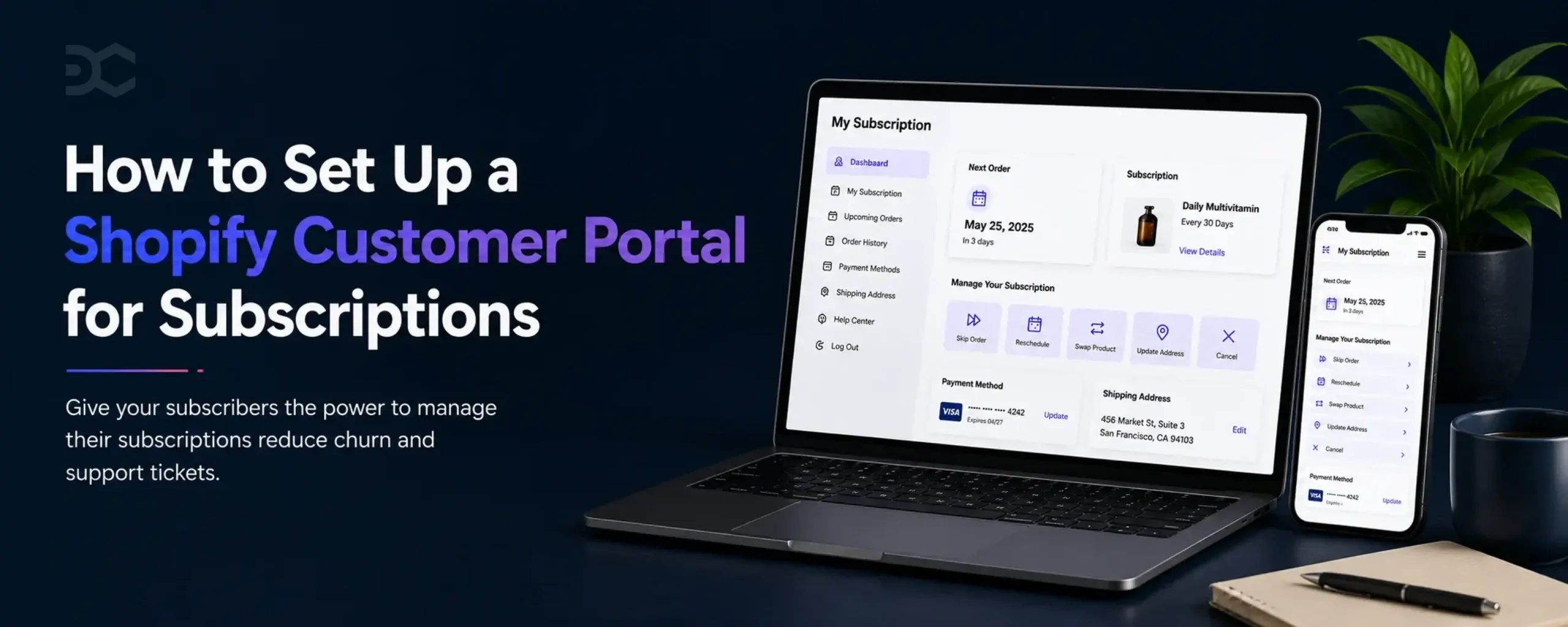
Inside it, your subscriber can see their next charge date, change how often they get shipped to, update their card, or cancel outright. Everything they’d otherwise need to contact you for lives in one place they control.
The difference matters more than it sounds. A generic account page tells someone what already happened. A real portal lets them change what happens next.
Why a Shopify Subscription Customer Portal Directly Reduces Churn
A skincare brand’s subscriber is heading on vacation next week. She doesn’t need her moisturizer showing up on her doorstep while she’s gone.
Without a portal, she has two options. Email support and wait for a reply, or just cancel now so she stops getting charged. Most people pick canceling, because it’s faster and she’s not sure anyone will read that email in time anyway.
With a portal, she logs in, skips next month’s shipment in two clicks, and closes the tab. She’s still a subscriber. You still have her.
That’s the entire mechanism behind reducing subscription churn with a customer portal. Most subscribers who cancel weren’t actually done with your product. They just hit friction at the exact moment they needed flexibility, and canceling was faster than waiting on you.
This same drop-off pattern shows up constantly in the first few months of a subscription, especially when nobody’s watching for the early warning signs. A portal is one of the simplest ways to catch it before it happens.
The subscribers who stay because skipping was easy don’t just protect this month’s revenue either. Every extra month they stick around adds up, and that gap between a subscriber and a one-time buyer only gets wider the longer they’re retained.
Core Features Every Shopify Subscription Portal Needs
Most portals look complete until a subscriber actually tries to use one. Then you find out what’s missing, usually through a support ticket.
Here’s what the best subscription portal features on Shopify actually cover, based on what subscribers ask for most.
Pause, Skip, or Resume
The single most requested action in any subscriber portal. If someone can’t delay a shipment without canceling outright, you’ve already lost them.
Product Swap
Subscribers change their minds. Someone who signed up for a moisturizer might want a serum next month instead. Let them switch without starting a new subscription from scratch.
Payment Method Updates
Cards expire. Subscribers move banks. A portal where updating a card takes thirty seconds keeps a failed payment from becoming an accidental cancellation.
Address Changes
People move. If updating a shipping address means contacting support, you’re creating unnecessary friction over something that should take one click.
Cadence Changes
Someone getting a coffee bag every two weeks might realize they only need one a month. Letting them adjust frequency themselves keeps them subscribed instead of pushing them to cancel out of frustration.
Billing History and Upcoming Charges
Subscribers who can’t see what they’ve been charged, or what’s coming next, start to distrust the whole relationship. Transparency here isn’t optional.
Cancellation Flow With a Save Offer
Cancellation should still be easy to find, but before it’s final, give the subscriber one real reason to stay, whether that’s a discount, a pause option, or a frequency change.
Branded, Mobile-First Design
A portal that looks like it was bolted on from a different app breaks trust at the exact moment you’re trying to build it.
Passwordless, Magic-Link Access
Most portals still make a subscriber log in with a password just to skip a delivery. That’s one extra step between “I want to change this” and actually changing it, and it’s often the step that makes someone give up and cancel instead. A link in their email that logs them straight into the portal skips that entirely. It sounds small, but it’s usually the difference between a portal subscribers actually use and one that mostly sits unopened in their inbox.
How to Set Up a Shopify Subscription Customer Portal
Most subscription apps hand you a working portal the moment you install them. The problem is almost nobody stops to configure it properly before turning it on.
Here’s how to set up a customer portal on Shopify without leaving gaps your subscribers will find for you.
- Choose a subscription app that includes a native portal. Not every app does this well, so check before you install rather than after.
- Turn on the portal in your app settings. Most apps ship it disabled or minimally configured by default.
- Add the portal link everywhere a subscriber would look for it. That means your account page, your order confirmation email, and your shipping notifications.
- Set up passwordless sign-in so subscribers can access their portal with a one-time code or magic link instead of a password.
- Match the branding to your store. Logo, colors, and tone should feel like the same brand, not a third-party tool bolted on.
- Decide what subscribers can change themselves. Some stores allow full control, others restrict certain actions like swapping between product categories.
- Test it as a subscriber would. Create a real test subscription and walk through skipping, swapping, and canceling before you assume it works.
- Check portal usage after launch. If subscribers aren’t using it, something in steps 1 through 7 needs a second look.
Shopify Subscription Portal Examples by Type
The features that matter most in a portal change depending on what you’re shipping.
Coffee runs on frequency. Someone drinking two cups a day needs bags more often than someone who only drinks on weekends, and getting that wrong means beans piling up or running dry mid-week. Cadence control isn’t a nice-to-have here. It’s the entire portal, which is worth knowing early if you’re still working out how to structure a coffee subscription in the first place.
Skincare subscribers want to swap products as their skin changes with the seasons or as new formulas come out. A portal built around skincare lives or dies on how easy that swap feels, not on how many pause options it offers.
Pet food has its own logic. Pets grow, diets change, and the portion size that worked at six months won’t work at two years. Adjusting product and quantity needs to feel just as easy as pausing.
Supplements are pause-heavy above almost everything else. People run out, forget to reorder, or stockpile and don’t need another bottle yet. The pause and skip flow carries more weight here than any other feature.
Meal kits are skip-heavy for a simpler reason. Travel, takeout, and busy weeks happen constantly, and making skipping a single click is often what keeps a subscriber from canceling out of guilt over unused boxes.
Shopify Subscription Customer Portal vs. Shopify Customer Account
They look similar from the outside. Both live behind a login, both show order history, and both sit somewhere near your storefront’s account icon.
The Shopify customer account page is built for one-time purchases. A customer can see what they’ve ordered, update their address, and check on shipping. That’s about the limit of it.
A subscription customer portal goes further, but only because it’s designed to. It lets a subscriber pause an upcoming shipment, swap products, change how often they get charged, or cancel outright, none of which the default account page handles on its own. Most subscription apps add this as a separate layer on top of, or instead of, the standard account experience.
The distinction matters because a subscriber who only has access to the default account page is stuck. They can look at what already happened, but they can’t change what happens next.
Common Shopify Subscription Portal Mistakes That Increase Churn
A portal that exists isn’t the same as a portal that works. Plenty of stores have one installed and still lose subscribers to the exact problems it was supposed to fix.
Forcing a Password Instead of a Magic Link
If a subscriber has to remember a password just to skip next month’s box, most won’t bother. They’ll either give up or cancel instead of fighting through a login screen.
Burying Cancellation Behind “Contact Support”
This backfires in the opposite direction most stores expect. Making cancellation hard doesn’t keep people subscribed, it makes them angrier when they finally do leave, and it turns a simple pause into a support ticket you didn’t need to handle.
Skipping Mobile Optimization
Most subscribers manage their portal from their phone, often while doing something else entirely. A layout that only works on desktop loses people before they’ve even found the pause and skip settings they came looking for.
Hiding the Next Charge Date
Subscribers who can’t easily see what’s coming and when start to feel like they’re being charged without warning. That feeling alone is enough to trigger a cancellation, even when nothing about the billing itself has changed.
Most of these come down to the same root cause. A proper cancellation flow setup treats the subscriber’s ability to leave easily as part of what keeps them staying, not something to make harder.
Shopify Subscription Customer Portal FAQ
What features should a Shopify subscription customer portal have?
Pause, skip, product swap, payment updates, address changes, and visibility into billing history and the next charge date. A portal missing even one of these usually means that action becomes a support email instead, which defeats the point of having a portal at all.
Does a customer portal reduce support tickets?
Yes, and the drop is significant. Self-service portals typically resolve 40 to 70% of subscription support requests without a subscriber ever contacting you, because most of what people email about, like skipping a delivery or updating a card, is something they’d rather just do themselves in thirty seconds.
Can customers access the portal without a Shopify account?
Yes, if the app supports passwordless or magic-link access. The subscriber clicks a secure link from an email or text, and it logs them straight into their portal with no password and no separate account required. Apps without this feature route subscribers through a full Shopify account login instead, which adds a step most people won’t bother finishing.
How do I cancel a customer’s subscription from my store’s backend?
Open your subscription app’s admin dashboard, find the customer’s profile, and cancel their subscription directly from there. You’d typically do this to process a refund, fix a billing mistake, or honor a cancellation request that came in by email instead of through the portal itself.
Do customer portals affect which payment gateways I can use?
Sometimes, because not every subscription app supports every Shopify payment gateway for recurring billing. Shopify Payments is generally the safest default, since most subscription apps are built to work with it directly. If you’re using a different gateway, it’s worth confirming with your subscription app that recurring charges are fully supported before you commit.
A customer portal isn’t a feature you install once and forget about. It’s the difference between a subscriber who quietly fixes a problem themselves and one who gives up and cancels because the fix wasn’t worth the effort.
The stores that get this right treat the portal as part of the product, not an afterthought bolted on after checkout. Every pause, swap, or address change a subscriber handles on their own is one less reason for them to leave.
Before you assume your current portal is doing its job, log in and try to skip a delivery yourself. If it takes more than a few clicks, that’s exactly where your next subscriber will drop off too.
Your subscribers shouldn’t need to email you just to skip a delivery. Most portals fail quietly, buried behind a password, a slow login, or a support form nobody wants to fill out, and when that happens enough times, subscribers just cancel instead. Driftcharge gives your subscribers a self-serve portal with magic-link access from day one, so pausing, swapping, or updating a card takes seconds instead of a support ticket.

Ganesh Pawar


Join the waitlist now
Limited early access. Early joiners receive additional discounts on premium features.
Discover how


You may also like
April 28, 2026
7 Reasons for Shopify Cart Abandonment and How to Fix Them

September 4, 2026
Shopify Subscription Trends 2026 Every Merchant Should Know