Why Meal Kit Subscription Customers Get Charged After Editing and How to Stop It
- Updated: May 12, 2026
Table of Contents
A subscriber edits their meal kit order, gets a confirmation, and then sees the original charge hit their card anyway. Within hours, you have an angry email in your inbox, a refund request, and a customer who no longer trusts your business. You did not make a mistake. Your system did exactly what it was built to do. That is the problem.
This is one of the most misunderstood pain points in the meal kit industry. Merchants assume an edit equals a billing update. It does not. Billing and editing operate on separate timelines, and when those timelines are not structured correctly, customers get charged for orders they have already changed. The edit went through. The charge did not follow.
Getting meal kit subscription management right means understanding that editing, billing, and fulfilment are three distinct processes that must happen in a specific sequence. When that sequence breaks down, no amount of customer service can recover the trust that gets lost. What follows explains exactly why this happens and what to put in place to stop it.
When Customers Edit Their Meal Kit Subscriptions and Still Get Charged
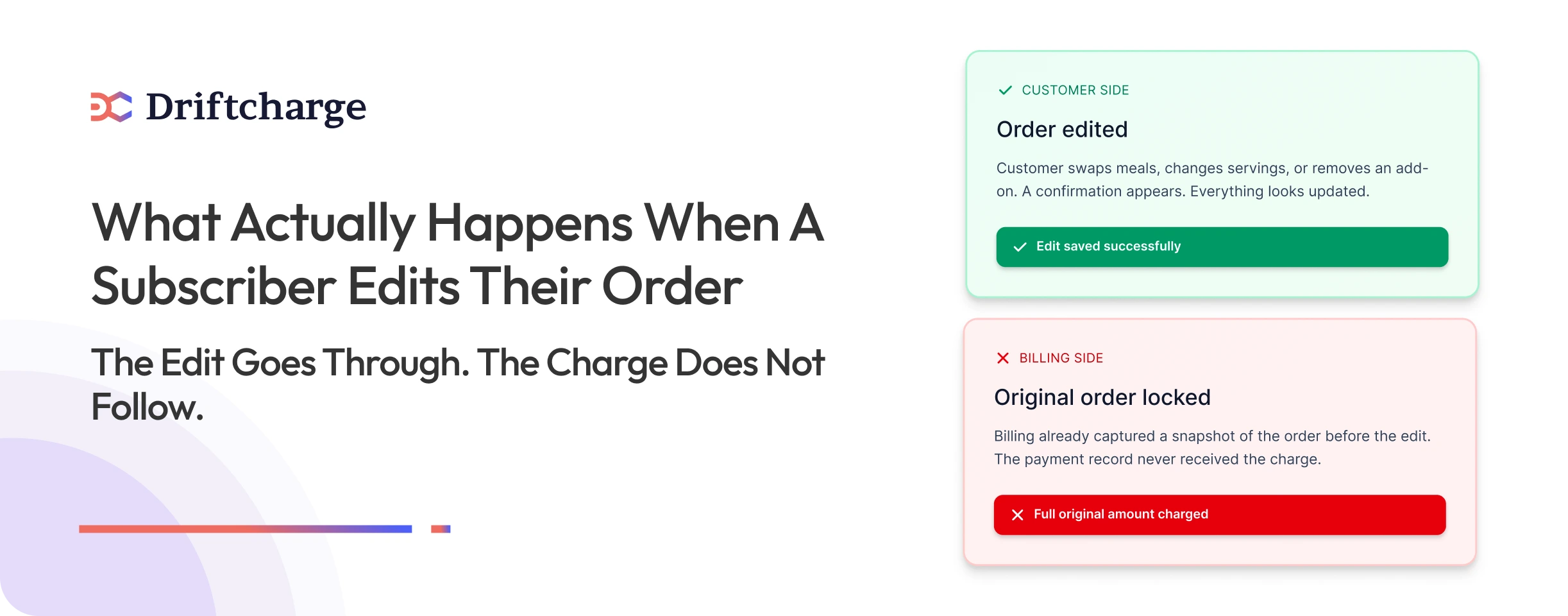
Unexpected charges after edits are one of the most common billing failure points in meal kit businesses. Each scenario below is not a customer complaint. It is a system timing gap that your cutoff configuration is either preventing or creating right now.
Swapping Meals After the Edit Deadline
Meal swaps submitted after the billing trigger has run confirm successfully on the order record while the payment record stays frozen at the pre-edit total. Your subscriber receives a confirmation. The payment that processes does not reflect it. The gap between what they see in their account and what appears on their statement is your refund liability and your first support ticket. The way your platform handles meal swapping determines whether that edit ever reaches the payment record at all.
Changing Quantities or Servings Too Late
A quantity change submitted after billing has initiated updates the visible order but leaves the captured amount unchanged. The difference between what was charged and what the updated order shows is a direct refund exposure. At low subscriber volumes this is manageable. At scale, this scenario compounds quickly because it generates both a refund request and an erosion of billing trust that accelerates skips and cancellations.
Removing Add-Ons but Seeing the Same Total
Add-on removals that arrive after the billing trigger has run update the order display but leave the payment record unchanged. The add-on is gone from the subscriber’s order view. The charge for it remains on their statement. That discrepancy between what the order shows and what was charged is the structure of a dispute. Not a technical failure, but a cutoff timing failure in your configuration.
Skipping a Delivery After Billing Has Already Started
A skip request submitted after billing has initiated processes successfully on the subscriber’s end while the charge for the skipped box still runs. This is one of the highest-risk scenarios in meal kit subscription management because it generates a payment dispute and a fulfilment question simultaneously. The box has been charged. The subscriber expects no delivery. Your operations and support teams now have to reconcile both at the same time.
Rescheduling Boxes That No Longer Affect Payment
Across subscription meal kits and subscription meal plans alike, rescheduling is one of the most operationally misunderstood edits. A reschedule submitted after billing has run adjusts the delivery window successfully while the captured charge stays exactly where it was. The reschedule worked. The payment record was never part of what moved. This is one of the most consistent silent churn triggers in meal kit businesses. Merchants see the cancellation event in their data with no preceding support ticket, because the subscriber did not escalate. They quietly stopped trusting the billing and left.
Why does billing not update after customers edit their orders
When a customer edits their meal kit order after billing has already initiated, the change does not reach the payment record. Billing captures an order snapshot the moment it runs. Anything edited after that point updates the order display but leaves the charge untouched.
What Happens to the Order Once Billing Is Prepared
The moment a billing cycle initiates, the system creates a payment record based on exactly what the order looks like at that instant. That record is what gets sent to the payment processor. Any edit made after billing runs change what the customer sees in their account but have no connection to the payment record that has already been created. The charge and the order have separated. One is locked. The other can still move.
Why the System Remembers Old Order Details
Subscription meal plans operate on a split system. There is an order record, and there is a payment record. They are linked before billing runs and are separated the moment it does. Edits after the billing trigger update the order record only. The payment record stays frozen at whatever the order looked like when billing was initiated. This is not a glitch. It is how subscription lifecycle management works across most billing infrastructures. Understanding this split is what separates merchants who prevent billing disputes from those who spend hours resolving them.
The three timelines that control meal kit subscription management
Every meal kit subscription runs on three separate timelines. Billing problems do not happen because systems malfunction. They happen because merchants treat these three timelines as one continuous process when they are not. Keeping them distinct is the foundation of meal kit subscription management.
The three timelines are:
- The Edit Window — the period when customers can safely make changes
- The Billing Window — the moment the customer is actually charged
- The Fulfilment Lock Window — when orders are sent to packing
The Edit Window
The edit window is the period during which a customer can change their order and have those changes actually reach the payment record. Once this window closes, edits may still appear to save on the customer side, but they will not affect what gets charged.
A practical example: if billing runs every Thursday at midnight, your edit window should close Wednesday at 6 PM. That six-hour buffer gives the system time to prepare billing against a stable, finalised order. Edits made before Wednesday 6 PM reach the charge. Edits made after do not.
The Billing Window
The billing window is the moment a payment intent is created or a charge is captured against the locked order. This is not a period. It is a trigger point. This is how recurring billing works across weekly subscription operations. The instant it runs, the order snapshot is frozen and sent to the payment processor.
For a weekly subscription meal kits operation running billing every Thursday at midnight, anything that happens after that trigger is invisible to the payment record. The customer can still edit their account display. The charge will not move.
The Fulfilment Lock Window
The fulfilment lock window is when order files go to the kitchen or packing facility. This must always come after billing has completed, never before and never simultaneously. Once order fulfilment begins, the physical order is in production and cannot be reversed.
Merchants who send fulfilment files before billing finalises create a compounding problem. A failed payment means a box already in production for a customer who has not been successfully charged. To use the same weekly example: if billing runs Thursday at midnight and the edit window closes Wednesday at 6 PM, fulfilment files should not go to the kitchen before Friday morning at the earliest. That single sequencing decision eliminates an entire category of operational error. Getting the full sequence configured correctly starts with understanding how weekly subscription cutoff dates work in practice before building your timeline around them.
The Most Common Cutoff Mistakes Meal Kit Brands Make
Most billing disputes in meal kit subscription management do not come from technical failures. They come from cutoff configurations that were never set up correctly in the first place.
Letting Customers Edit After Billing
The edit portal stays open past the billing trigger. Customers make changes, see a confirmation, and assume their order has been updated. The payment record never receives those changes. The dispute arrives two days later.
Closing the Edit Window Too Late
The edit window closes at the same moment billing runs, leaving no buffer between the two. Any delay in billing processing creates an overlap where edits and charges are competing for the same order record at the same time.
Sending Fulfilment Files Before Billing Is Finalised
The kitchen or packing facility receives order files while billing is still processing. If a payment fails at that point, a box is already in production for a customer who has not been successfully charged.
The operational and financial cost of that mistake compounds quickly in any meal kit business running at volume, and it often starts with the same root causes behind subscription payment failures that merchants overlook until they are already losing money.
Not Showing Clear Deadlines to Customers
Customers have no visibility into when their edit window closes. They make changes late in the cycle, assume everything was captured, and dispute the charge when the original amount appears on their statement.
Each of these mistakes on its own is recoverable. Together, they create the conditions for subscriber churn that compounds faster than most merchants expect.
How Being Charged After Editing Leads to Refunds and Cancellations
A billing error feels minor from the outside. From inside a meal kit business, it is anything but. Each instance sets off a chain of events that costs money, time, and subscriber trust.
Refunds and Payment Disputes
When a subscriber sees a charge that does not match the order they edited, the first move is a refund request. If that request goes unresolved or takes too long, it escalates to a dispute or chargeback. Chargebacks carry a direct financial penalty and repeated disputes damage your standing with your payment processor, which creates problems that reach well beyond a single billing cycle.
Support Overload and Angry Emails
Billing surprises generate more support tickets than almost any other issue in subscription businesses. Every email takes time to investigate, explain, and resolve. At low subscriber counts, that is manageable. As your base grows, unresolved billing confusion scales into a support burden that pulls focus away from every other part of the operation.
Increased Skips and Subscription Cancellations
Subscribers who cannot trust that their edits are reflected in their charges start skipping more frequently. Consistent skips are a measurable churn precursor in subscription meal plans. They register in your skip rate and cancellation data before they surface in your support inbox. By the time the pattern is visible, the window to intervene has already closed. This follows the same pattern behind subscription drop-off in the first 90 days that costs merchants their earliest and most valuable subscribers. When meal kit subscription management becomes reactive at this stage rather than preventive, the cancellations that follow are structurally difficult to recover.
How to set safe edit and billing cutoffs for your meal kit business
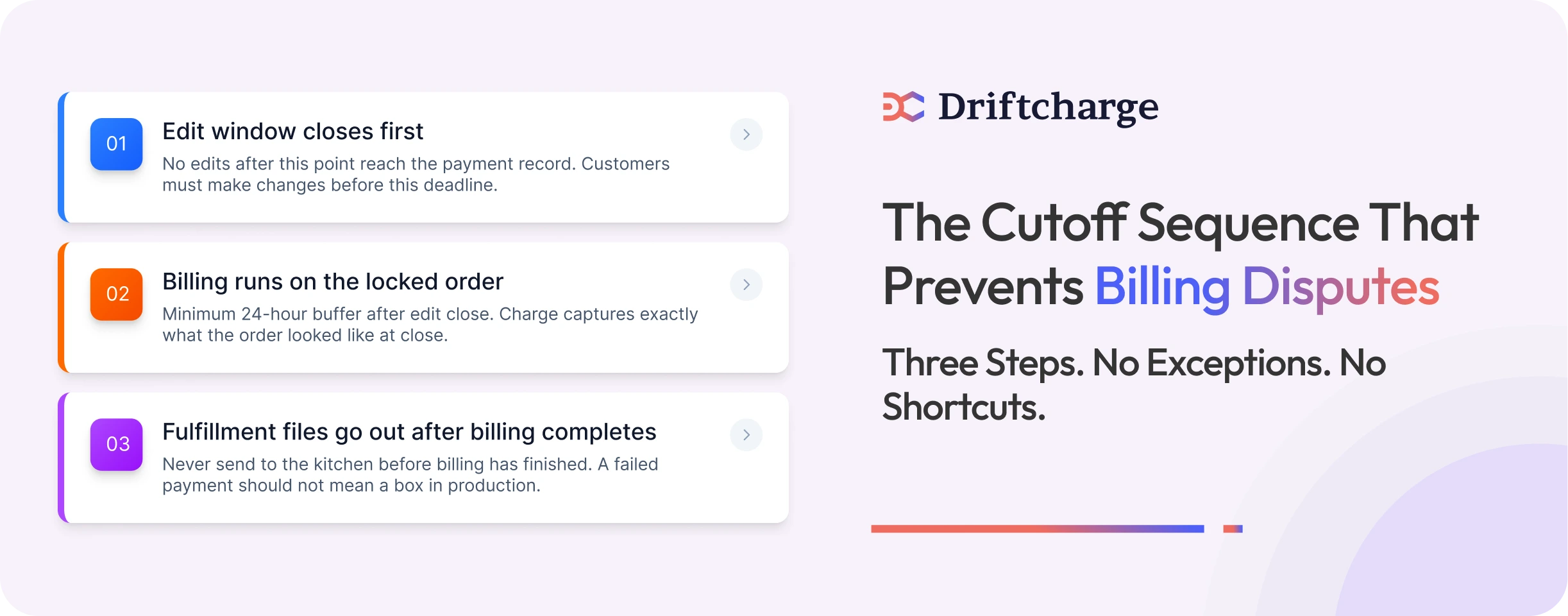
Getting the cutoff sequence right is not complicated. But it has to be deliberate. The three steps below are non-negotiable for any meal kit business running subscription meal plans on a weekly cycle.
Step One: Edit Closes, Billing Runs, Fulfilment Locks
This is the only sequence that works. The edit window closes first. Billing then runs against the locked order. Fulfilment files go to packing only after billing has been completed. Never simultaneously. Never in reverse.
A concrete weekly example: edit window closes Monday at 8 PM. Billing runs on Tuesday at midnight. Fulfilment files go to the kitchen on Wednesday morning. Each stage has its own clearly defined moment, and nothing overlaps.
Step Two: Choose Realistic Deadlines for Weekly Subscriptions
The edit window needs a genuine buffer before billing runs. A minimum of 24 hours between edit close and billing trigger gives the system time to process, gives customers time to act on reminder notifications, and gives your team time to catch anything unusual before charges go out.
Step Three: Verify That Edits Always Reach the Payment Record
Do not assume your setup handles this correctly. Test it. Make a change to a test order before the edit window closes and confirm that the payment record reflects that change when billing runs. Then make the same change after the edit window closes and confirm the payment record does not move. If both tests pass your cutoff flow is working. If either fails you have a configuration problem that will generate billing disputes at scale. Getting this right from the beginning is one of the most important decisions you make when you are launching a meal kit subscription business on Shopify.
How to clearly communicate edit deadlines to your subscribers
A perfectly configured cutoff sequence still fails if customers do not know when their window closes. The technical side and the communication side have to work together. One without the other creates disputes.
What to Show on the Customer Account Page
Your order portal should surface the edit deadline directly on the order card. Not inside a help article, not behind a tooltip, not buried in a terms page. The subscriber needs to see the deadline at the exact moment they are looking at the order they might want to change.
Placement is the variable that eliminates the “I did not know the window had closed” dispute before it starts. How you surface edit deadlines for customers in your subscription setup determines whether they act in time or miss the window without realising it.
What to Include in Reminder Emails or SMS Notifications
Your notification needs to do three things: state the exact deadline, link directly to the order edit page, and tell the subscriber plainly what happens once the window closes. A message that does all three removes the information gap that most billing disputes are built on. No assumptions. No fine print.
How Clear Messages Prevent Billing Disputes
Most billing disputes after editing do not happen because the system failed. They happen because the customer did not know the window had closed. When the deadline has been shown on their account page and confirmed in a reminder notification, the billing surprise disappears. Meal kit subscription management at this level is as much about communication design as it is about technical configuration.
Building a subscription setup that prevents billing surprises
Most billing disputes are not random. They are the predictable result of a subscription setup that was not built with the edit, billing, and fulfilment sequence in mind. The right setup does not just reduce disputes. It makes them structurally unlikely.
What a Well-Structured Meal Kit Subscription System Handles Natively
A setup built for subscription meal kits should give you configurable edit windows that close independently of billing, billing triggers that only run against finalised orders, fulfilment locks that activate after billing completes, and customer-facing deadline visibility built into the order portal. These are not advanced features. They are the baseline requirements for any merchant who wants to run a subscription operation without constant billing firefighting.
How Driftcharge Approaches These Cutoff Principles
Driftcharge is being built around the principle that edit windows, billing, and fulfilment must operate as three distinct and sequenced stages from day one. The cutoff logic is structural by design. Not a setting merchants have to maintain carefully. Not a workaround bolted on after the fact. For merchants who want to get this right before they scale, that design decision is what the platform is being built on.
Why Getting the Setup Right From Day One Matters
When billing, editing, and fulfilment each have their own clearly defined moment, disputes stop. Not because the system became more forgiving, but because it was built correctly from the start. Merchants who get this sequencing right before they scale protect their payment processor standing, their refund rate, and their subscriber retention from day one. That foundation is what makes growing your first subscribers into a loyal base possible rather than an uphill battle.
A meal kit subscriber who stays 6 months is worth 6x a one-time buyer. Billing disputes cut that timeline short before it ever starts. Driftcharge is being built so that meal kit brands on Shopify never have to patch that problem after the fact.

Ganesh Pawar


Join the waitlist now
Limited early access. Early joiners receive additional discounts on premium features.
Discover how